
A good tree mirrors how your people already divide up their work — the places they look after, the things they keep, and who answers for each. Settle its shape before you fill it in, because where something sits decides where entries are filed, what they add up to, and who can see them.
Levels that earn their place
Each level of a tree is a category: an organisation at the top, then sites, then the areas within each site, and so on down. Before you add a level, check that it does at least one of these jobs:
- Entries belong there. If your team logs things against a particular area or room, that place needs to exist so each entry has somewhere to go.
- You want to see things by it. Entries roll up the branch, so a site's page gathers everything filed beneath it, and tables of entries can be filtered by each level above them.
- Responsibility divides along it. Sharing a place always includes everything beneath it, so each level is a line you can draw between who sees what. See Access and sharing.
A level that does none of these costs more than it gives. Every level is another choice for the people logging entries: when they log from a page, the places above it are filled in for them, and each level below is one more thing to pick.
Keep the shape balanced
Aim for a handful of children under each parent. A level with hundreds of items side by side is hard to browse and slow to pick from, while a chain where each parent has a single child adds a step without telling anyone anything. If one level grows wide, a grouping level above it — by region or by type — makes it easier to read.
Names and categories
Category names are unique across your organisation, and each category belongs to exactly one tree. If two trees both need a level of sites, give each level its own name, such as Site in one tree and Depot in the other.
Item names only need to be unique among items of the same category under one parent, so every site can have its own Kitchen or Car Park.
Logs vs registers
Trees come in two common shapes: a log of what happens at your places, and a register of the things you keep. Decide which one you are building before you add the first level, because the shape decides what the bottom of the tree is.
To tell which you need, ask whether an entry is about something that happened somewhere, or about a thing you look after. An incident at a site belongs in a log; a service on a van belongs in a register. If you need both, build both — as separate trees.
Keep each shape in its own tree. Every tree begins at its own root and keeps its own kinds of entry, so a register's inspections never share a form with a log's incident reports. When you start a tree with "New root", you name it, pick its category and choose what kind of entry it keeps — one you already have, a fresh one, or none yet if you would rather lay out the places first.
In a register, name each item the way people already refer to it, such as a fleet number or an asset tag, so the "Search the directory..." box finds it. For a closer look at both shapes, see Logs and registers.
A worked example
Fairview Operations Group keeps three trees side by side, one for each kind of information it tracks.
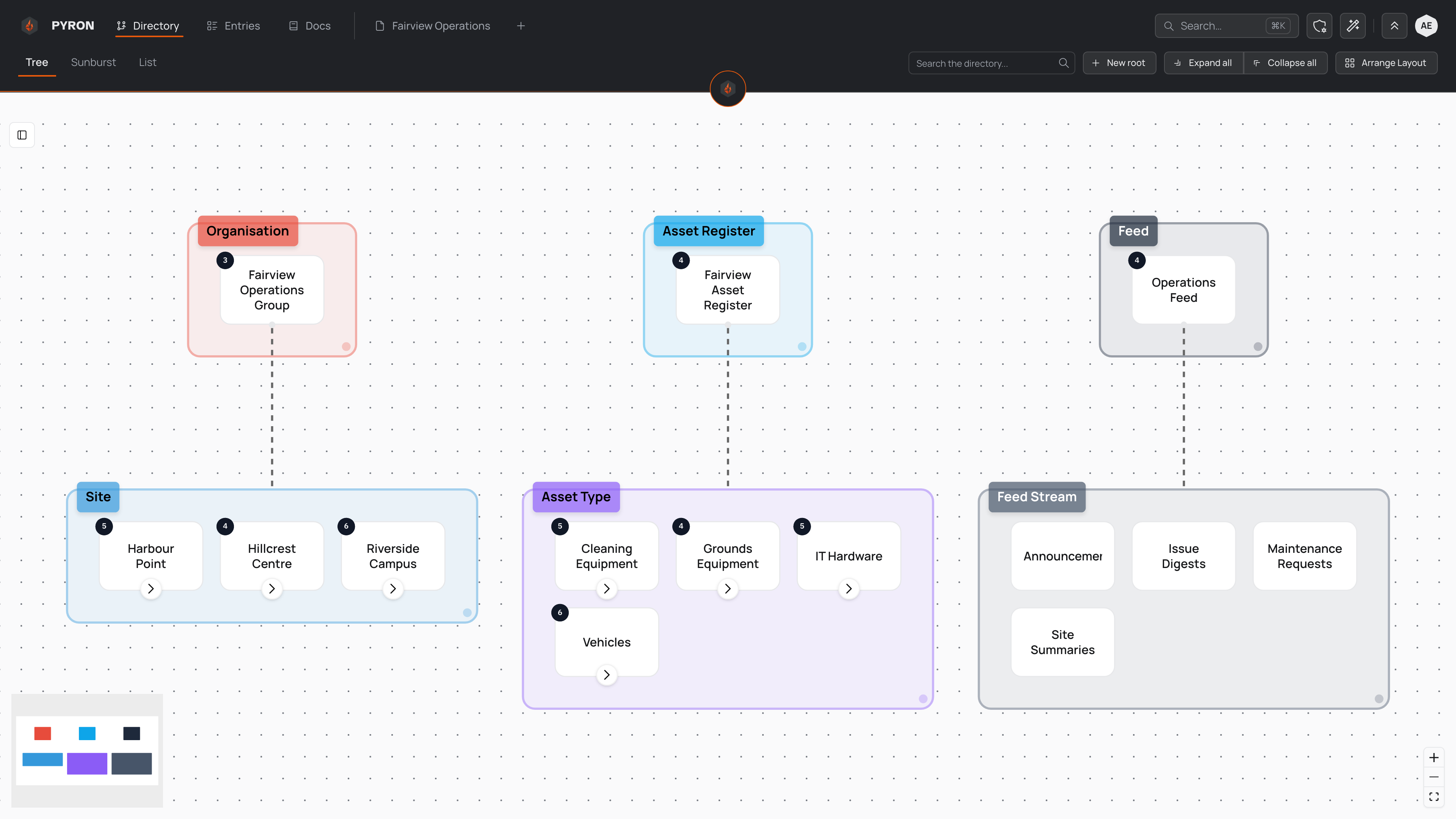
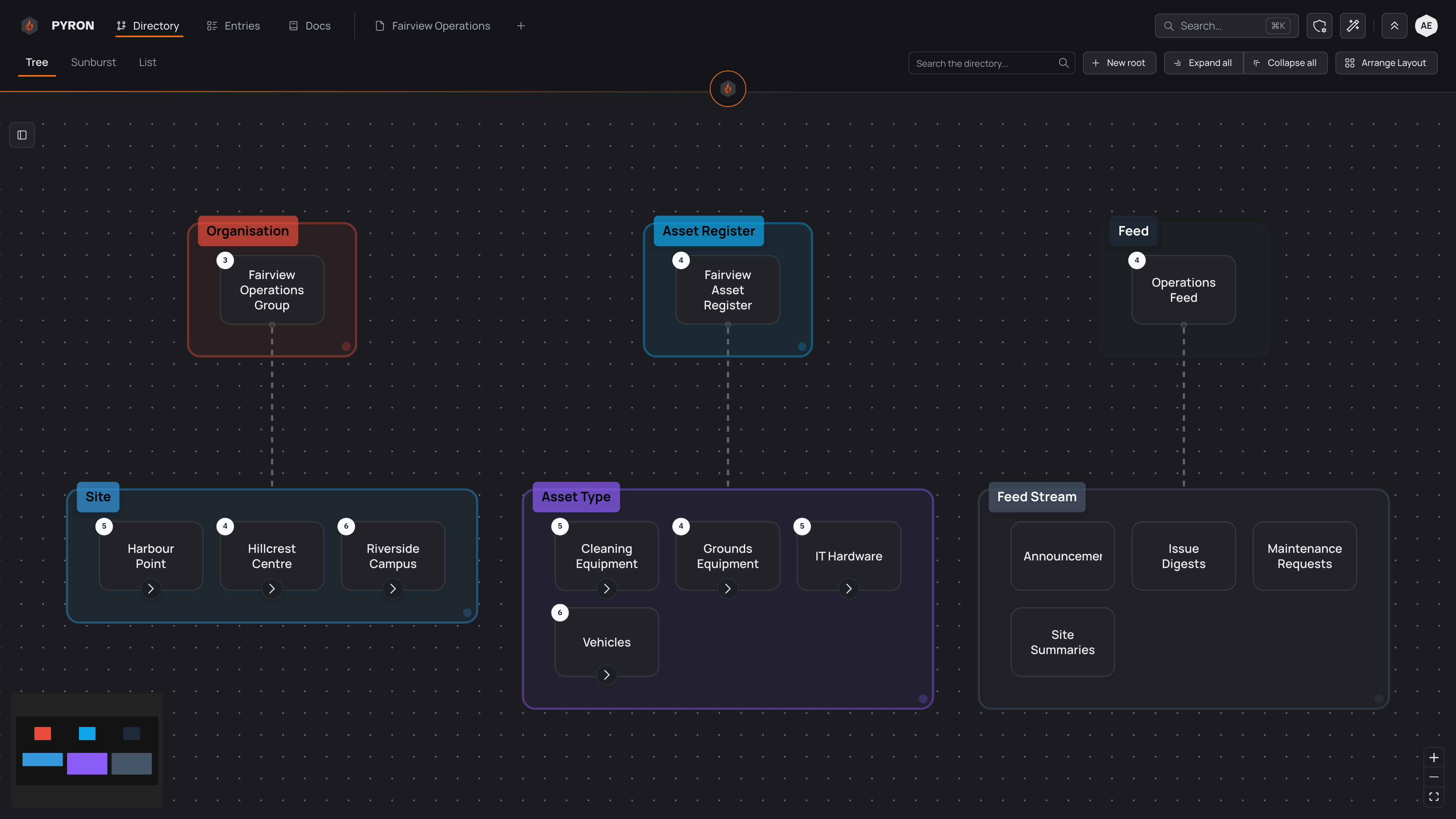
Each coloured box gathers the items of one category and carries that category's name, and the number on a card counts what sits directly beneath it.
- Fairview Operations Group is the log. Its three sites — Harbour Point, Hillcrest Centre and Riverside Campus — each hold their areas, with locations inside those. Daily activity is filed at the place it happened, so a site's page brings together everything logged anywhere on that site. Sites are also the natural line for access: share a site with its manager, and they reach every area beneath it.
- Fairview Asset Register is the register. Its four asset types — Cleaning Equipment, Grounds Equipment, IT Hardware and Vehicles — group the individual assets beneath them, and each asset collects its own inspections. The asset types earn their place by letting people browse one kind of equipment at a time.
- Operations Feed holds the updates teams follow: Announcements, Issue Digests, Maintenance Requests and Site Summaries. It is neither a list of places nor a list of things, so it sits apart, under its own root.
No category name repeats across the three trees — Site, Asset Type and Feed Stream each belong to one tree only. The areas and locations stay hidden until you open a site; select "Expand all" to open every branch at once.
Building a tree like this
- On the Directory page, select "New root" to start the first tree — here, the organisation. Name it, pick its category (you can create one from the same list), and choose what kind of entry it keeps.
- Add the first level beneath the root, giving it its own category, such as Site. See Adding an item.
- Work down one level at a time, checking that each new level earns its place.
- Repeat for each further tree, such as an asset register, with category names of its own.
- Select "Arrange layout" to tidy the canvas. See Arranging the tree.